
IPTV Pro - M3U Player1.0.29 - App Store
You'll be able to see results in few seconds.
Publisher Description


WATCH YOUR IPTV WHEREVER YOU GO WITH IPTV PRO!
KEY FEATURES
- Multiple M3U Playlists
- Create Multiple Groups of your Favourite Channels
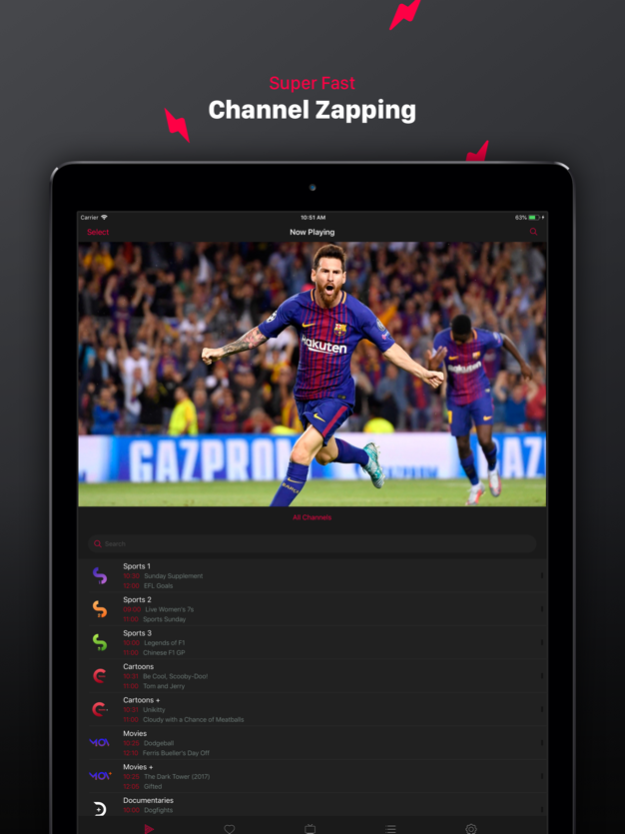
- Super fast Channel Zapping
- Electronic Program Guide (in app purchase)
IMPORTANT NOTE: IPTV Pro does not offer any streams or playlists. You will need to add your own m3u playlists to the app. These will be provided by your IPTV Service Provider.
AirPlay and ChromeCast are supported, but the feature availability depends on your IPTV provider’s video format, and whether both technologies support that video format.
IPTV Pro is an M3U player like no other. It looks great, it's simple to use and is packed full of exclusive features. With IPTV Pro you can take your IPTV subscription and watch your favourite channels and video wherever you go on your iPhone.
Load Multiple M3U Playlists - You can load an infinite number of M3U playlists. You can choose to play them individually or all together; there are no limits.
Create Multiple Groups of your Favourite Channels - IPTV Pro lets you create groups of your favourite channels so that they are easier to access.
Channel Zapping - IPTV Pro zaps super fast through your channels whilst leaving you free to navigate through your groups, playlists and movies
Electronic Program Guide - Subscribe to get EPG on IPTV Pro for reliable and accurate information on whats currently playing and whats coming up for up to a week. EPG only costs €0.99 every two months.
And many more features you just need to find out for yourself.
IPTV Pro is an M3U player and does not provide IPTV services. For this reason the EPG might not be fully compatible with your provider. We suggest you use the free trial period to test compatibility.
Disclaimer:
- IPTV Pro does not supply or include any media or content, and users must provide there own content.
- IPTV Pro has no affiliation with any third-party provider what so ever.
- Only legal and legitimate IPTV services are endorsed and supported.
- We do not endorse or support the streaming of copyright protected content without the permission of the copyright holder
Subscriptions:
- EPG (Electronic Programming Guide): €0.99 every 2 months, 1 month Free Trial
- Prices may vary by location. Subscriptions will be charged to your credit card through your iTunes Account.
- Your subscription will be automatically renewed unless canceled at least 24 hours before the end of the current time.
- You will not be able to cancel the subscription once activated.
- You can manage your subscriptions in the Account Settings after the purchase.
- Any unused portion of the free trial period will be forfeited when a subscription is purchased.
Privacy Policy: http://iptvpro.herokuapp.com/privacyPolicy
Terms & Conditions: http://iptvpro.herokuapp.com/termsConditions
Aug 8, 2018
Version 1.0.29
This app has been updated by Apple to display the Apple Watch app icon.
Fixed issue where some playlists were not loading all channels
About IPTV Pro - M3U Player
The company that develops IPTV Pro - M3U Player is Glenn Calleja. The latest version released by its developer is 1.0.29.
To install IPTV Pro - M3U Player on your iOS device, just click the green Continue To App button above to start the installation process. The app is listed on our website since 2018-08-08 and was downloaded 0 times. We have already checked if the download link is safe, however for your own protection we recommend that you scan the downloaded app with your antivirus. Your antivirus may detect the IPTV Pro - M3U Player as malware if the download link is broken.
How to install IPTV Pro - M3U Player on your iOS device:
- Click on the Continue To App button on our website. This will redirect you to the App Store.
- Once the IPTV Pro - M3U Player is shown in the iTunes listing of your iOS device, you can start its download and installation. Tap on the GET button to the right of the app to start downloading it.
- If you are not logged-in the iOS appstore app, you'll be prompted for your your Apple ID and/or password.
- After IPTV Pro - M3U Player is downloaded, you'll see an INSTALL button to the right. Tap on it to start the actual installation of the iOS app.
- Once installation is finished you can tap on the OPEN button to start it. Its icon will also be added to your device home screen.
Program Details
System requirements
Download information
Pricing
Version History
version 1.0.29
posted on 2018-08-08
Aug 8, 2018
Version 1.0.29
This app has been updated by Apple to display the Apple Watch app icon.
Fixed issue where some playlists were not loading all channels
version 1.0.29
posted on 2018-08-08
Aug 8, 2018 Version 1.0.29
This app has been updated by Apple to display the Apple Watch app icon.
Fixed issue where some playlists were not loading all channels
Disclaimer
Official App Store Link
We do not host IPTV Pro - M3U Player on our servers. We did not scan it for viruses, adware, spyware or other type of malware. This app is hosted by Apple and passed their terms and conditions to be listed there. We recommend caution when installing it.
The App Store link for IPTV Pro - M3U Player is provided to you by apps112.com without any warranties, representations or guarantees of any kind, so access it at your own risk.
If you have questions regarding this particular app contact the publisher directly. For questions about the functionalities of apps112.com contact us.
